
Capture should still work without analysis
A product record does not need an AI-generated description to be useful. You can enter a name and category manually, add a photo if you want one, and continue with your own notes. This remains available whether you are using a guest shelf or an account shelf.
Analyze photo is an optional feature for signed-in users. It is separate from choosing a photo and separate from saving a product. Selecting an image does not silently start a provider request. Uselyt asks for explicit confirmation before sending the selected JPEG, including any visible text, through the account service to OpenAI GPT-4.1 mini.
Whether you enter the details yourself or review photo suggestions, the goal is the same: a record you recognise and understand. The extra help is there when you choose it, while your own judgement remains at the centre of capture.
Choose the photo you are comfortable sharing
Before confirming analysis, look at the whole image rather than just the product. A label may be useful, but a receipt, address, another person, or an unrelated document might also be visible. The selected image is the information being shared; there is no promise that only the text you had in mind will be visible to the service.
A closer product photo can make your intention clearer. If the image includes something you would rather keep local, you can choose another photo or use manual entry. This is a practical choice at the moment of capture, not a requirement to give the service access to your entire library.
The saved product shelf is not uploaded when you sign in. Photo analysis is a specific request for the image you confirm, not product cloud sync. Separating those actions keeps an account session from being mistaken for permission to upload every product record.
A suggestion can help with capture. Your review makes it a product memory.
Treat the result as a starting point
The returned suggestions may include a product name, brand, category, package size, readable ingredients, and observations visible in the photo. A label can be partly hidden, reflective, worn, or simply ambiguous. Similar packaging can also make one product look like another.
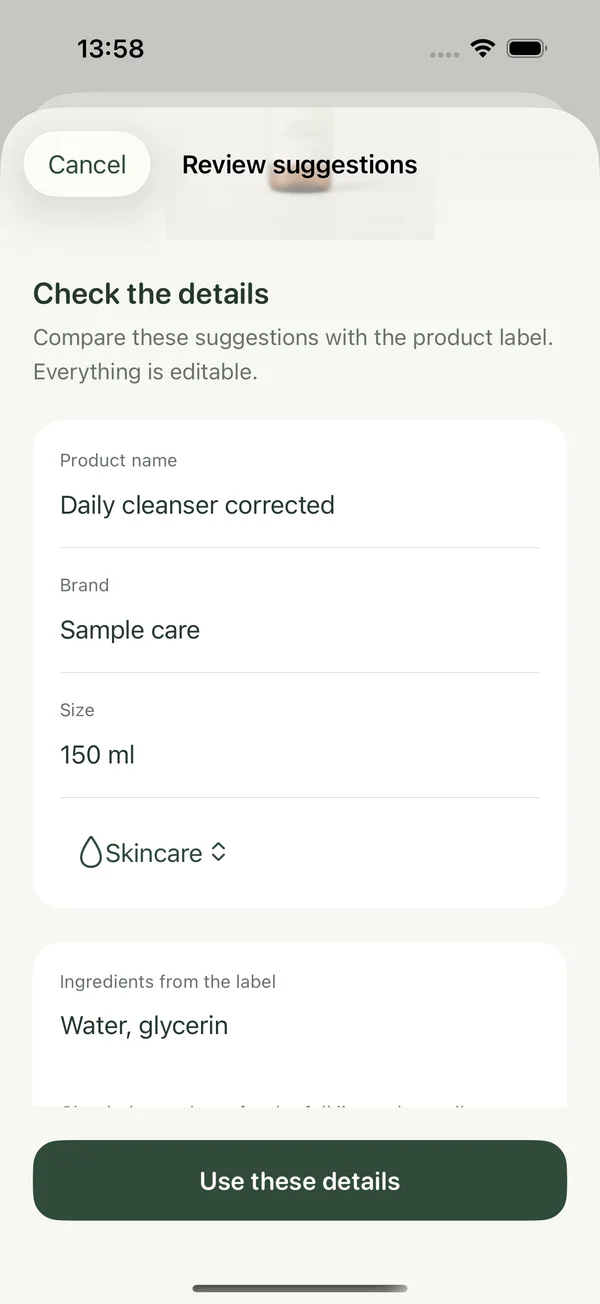
Review the suggested identity against the actual item. Check the size and unit. Read any proposed ingredient text rather than assuming it is complete. Correct details that do not match, and leave out information you cannot verify. A blank field can be more useful than a confident-looking mistake that will confuse a future search.
Photo analysis does not establish allergy suitability, safety, or a precise amount remaining. Visible text and observations are not a substitute for the actual label or an appropriate expert when those questions matter. Uselyt uses the result to assist product capture, rather than turn an uncertain photo into a guarantee.
Applying details is not the same as saving
After review, applying suggestions updates the capture draft. It does not automatically create a saved product. The separate save is the moment when you decide that the edited record belongs on your local shelf. You can continue changing a draft or return to it later.
This separation matters because recognition and commitment are different decisions. The service can offer a likely name, but you know which product is in your hand. A draft gives you room to make that judgement without treating the first response as final.
Your personal notes and later verdict are still your own. Analysis does not decide whether you liked the product or should buy it again. Those parts of the memory come from use, check-ins, and the finish you record.
Understand what the service keeps
The Uselyt Worker does not store the analyzed photo or result in its database or object storage. OpenAI has its own provider retention practices, so this should not be read as a promise that the image has no retention anywhere. The request uses store:false, and the Privacy Policy explains the processing boundary.
The account service keeps per-account attempt counts to enforce a limit of twenty analysis attempts per UTC day. Those counters are cleaned up after seven days or account deletion. They are usage records, separate from the local product collection and from the optional motion preference on this website.
The useful outcome is modest: less typing, followed by a careful review. Share only when you choose, keep only the details that make sense, and save when the record is ready. For the fuller account and photo-processing explanation, read the Uselyt Privacy Policy before using analysis.
Read the full photo-analysis privacy explanation, or contact support@uselyt.app with a question.